AI Agents Replacing Departments (Not Just Chatbots)
 العربية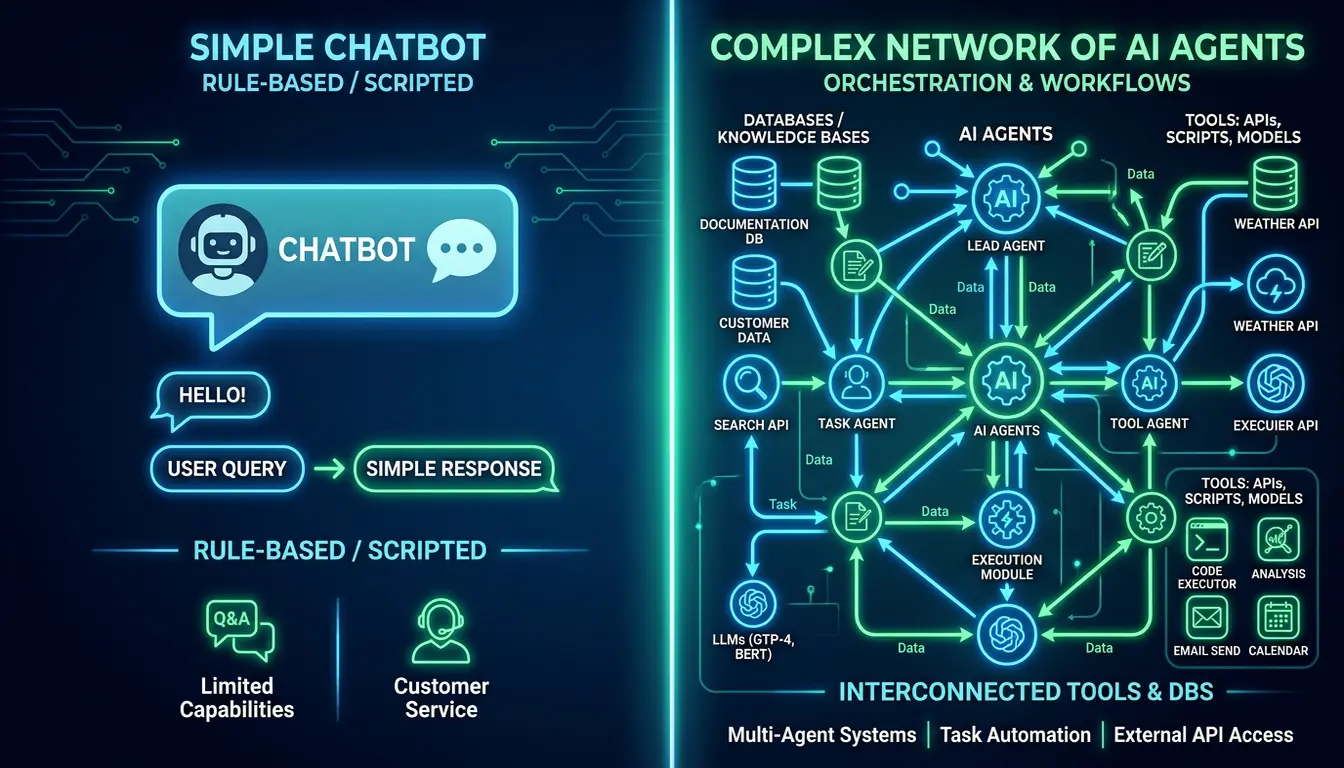
Chatbots answer questions. AI agents replace departments.
Most businesses are still stuck thinking AI means ChatGPT in a browser tab. Meanwhile, forward-thinking companies are quietly replacing entire functional teams with AI agents that have tools, memory, and autonomous workflows.
Here's what's really happening — and how to tell if you're dealing with a chatbot or a true agent.
The Fundamental Difference
Chatbots:
- Reactive — Only works when you prompt it
- Stateless — Forgets everything between sessions
- Single-turn — One question, one answer
- No tools — Can't access your email, calendar, CRM
- Cloud sandbox — Lives on someone else's servers
AI Agents:
- Autonomous — Executes tasks without constant supervision
- Persistent memory — Remembers context across weeks/months
- Multi-step workflows — Chains together complex processes
- Tool access — Reads email, updates CRM, schedules meetings, sends messages
- Your infrastructure — Runs on hardware you control
The gap isn't subtle. It's the difference between a calculator and an accountant.
Real Examples of Department-Level Replacement
1. Customer Support Department → AI Support Agent
Klarna (2025-2026):
- Replaced 700 customer support workers
- AI now handles 2/3 of all support conversations
- Response time: 11 minutes → 2 minutes
- Customer satisfaction improved despite fewer humans
- Remaining staff: 35 human supervisors managing AI escalations
The agent doesn't just answer FAQs — it accesses customer accounts, processes refunds, updates orders, and escalates complex issues with full context.
2. Sales Development Rep Team → AI Lead Qualification Agent
Typical SaaS company (2026):
- Used to employ 8 SDRs at $60K/year each ($480K annual cost)
- Now: 1 AI agent + 2 senior closers
- Agent handles: Lead enrichment, outbound sequences, meeting booking, CRM updates
- Humans handle: Discovery calls, demos, negotiations
- Result: 60% cost reduction, 40% more qualified meetings
The key? The agent has memory. It remembers every interaction, tracks buying signals, and knows when to escalate to a human.
📬 Get practical AI insights weekly
One email/week. Real tools, real setups, zero fluff.
No spam. Unsubscribe anytime. + free AI playbook.
3. Back-Office Operations → AI Ops Agent
Mid-size accounting firm (Dubai, 2026):
- Replaced 12-person ops team with 3 supervisors + AI agent
- Agent handles: Invoice processing, payment reminders, vendor coordination, expense categorization
- Tools it uses: Email, Xero, bank API, Slack
- Outcome: 75% faster processing, 90% fewer errors
The agent doesn't wait for someone to upload a spreadsheet — it monitors email, extracts invoices, cross-references purchase orders, and flags anomalies.
4. Content/Marketing Team → AI Research + Production Agent
B2B content agency (2026):
- Used to employ 6 junior writers + 2 editors
- Now: 2 senior strategists + AI content agent
- Agent workflow: Monitor industry news → Identify trending topics → Draft outlines → Generate first drafts → Submit for human review
- Humans: Set strategy, final editing, client relationships
- Output: 3x more content with higher consistency
What Makes This Possible? Three Capabilities
1. Tool Access (Function Calling)
Modern AI models (Claude 3.7, Gemini 3.1, GPT-5) can use software tools reliably:
- Read and send emails via Gmail/Outlook API
- Create/update CRM records (Salesforce, HubSpot, Zoho)
- Schedule calendar events
- Process payments via Stripe/PayPal
- Update spreadsheets and databases
This isn't theoretical — it works today, reliably, at scale.
2. Long-Term Memory
AI agents maintain context across:
- Customer histories (every interaction, preference, complaint)
- Project timelines (what was promised, when, to whom)
- Company knowledge base (policies, procedures, past decisions)
With 2M+ token context windows (Gemini 3.1 Pro), agents can "remember" years of interactions without forgetting.
3. Workflow Orchestration
Agents can execute multi-step processes:
- Monitor email for new customer inquiry
- Check if customer exists in CRM (if not, create record)
- Analyze inquiry type and urgency
- Draft personalized response based on customer history
- Send reply and log interaction
- Schedule follow-up in 3 days if no response
- Escalate to human if customer replies with frustration
A chatbot can't do step 1. An agent does all 7 automatically.
Why Now? (2026 vs 2024)
Two years ago, this was science fiction. What changed?
Reliability Crossed the Threshold
- 2024: AI tools worked 70% of the time (not good enough for production)
- 2026: AI tools work 95%+ of the time (good enough to replace humans with supervision)
Cost Dropped 10x
- GPT-4 (2024): $30 per 1M tokens
- Gemini 3.1 Pro (2026): $1.25 per 1M tokens
Running an AI agent 24/7 now costs $50-200/month vs $3,000-6,000/month for a human.
Infrastructure Matured
Platforms like OpenClaw, Langchain, and vendor-specific solutions (Salesforce Agentforce, HubSpot AI Agents) make deployment accessible to non-technical teams.
The Hard Truth: Which Departments Are at Risk
High risk (50%+ of jobs will transform or disappear by 2028):
- Customer support (tier 1 + tier 2)
- Data entry and processing
- Sales development reps
- Accounts payable/receivable
- Junior content writers
- Email/calendar management roles
Medium risk (roles will evolve but not disappear):
- Middle management (coordinators, project managers)
- Junior analysts
- Recruiters (sourcing/screening)
- Marketing coordinators
Low risk (AI augments but doesn't replace):
- Strategic roles (leadership, planning)
- Creative roles (design, high-level copywriting)
- Relationship roles (sales closers, account managers)
- Compliance/legal (requires human judgment)
What to Do If You Run a Business
Step 1: Audit Your Departments
Ask for each role:
- What percentage of their work is repeatable?
- How much requires human judgment vs following a process?
- Could this be documented in a clear workflow?
If 70%+ is repeatable, that role is a candidate for AI automation.
Step 2: Start with One Department
Don't try to automate everything at once. Pick one:
- High volume of work
- Clear processes
- Measurable outcomes
Customer support and lead qualification are common starting points.
Step 3: Deploy, Measure, Iterate
Run the AI agent alongside humans for 30-60 days:
- Measure accuracy and speed
- Identify edge cases where it fails
- Train it on those cases
- Gradually increase autonomy
Only replace humans once the agent consistently outperforms them on routine tasks.
The 2026 Reality
AI agents aren't coming — they're already replacing departments.
The companies adapting fastest aren't necessarily the tech giants. They're the ones willing to rethink org charts from first principles.
The question for every business owner: Do you want to lead this transformation, or get disrupted by someone who does?
This is just the basics.
We handle the full setup — AI assistant on your hardware, connected to your email, calendar, and tools. No cloud, no subscriptions. Just message us.
Get Your AI Assistant Set UpRelated Articles
AI Bots Just Officially Overtook Humans on the Internet
HUMAN Security report reveals automated bot traffic now grows 8x faster than human activity online. What this means for your business and AI agents.
OpenClaw Just Solved the Biggest Problem with AI Agents
OpenClaw's new human-in-the-loop approval system means AI agents can act autonomously but still need your OK for critical decisions. Supervised autonomy explained.
PwC Built an AI Agent for Enterprise Spreadsheets — Why This Matters More Than You Think
PwC launched a frontier AI agent that reasons over enterprise spreadsheets with 3x accuracy. Here's why this changes everything for business automation.